Implementation Mode

Plan, Configure & Implement Odoo Projects with Confidence

Implementation Mode turns an approved project scope into a guided implementation journey. It helps teams install required apps, configure settings, set up workflows, manage users and access rights, prepare and import data, validate results, track progress, and get ready for go-live with confirmation and rollback support.

Demo

See Implementation Mode in Action

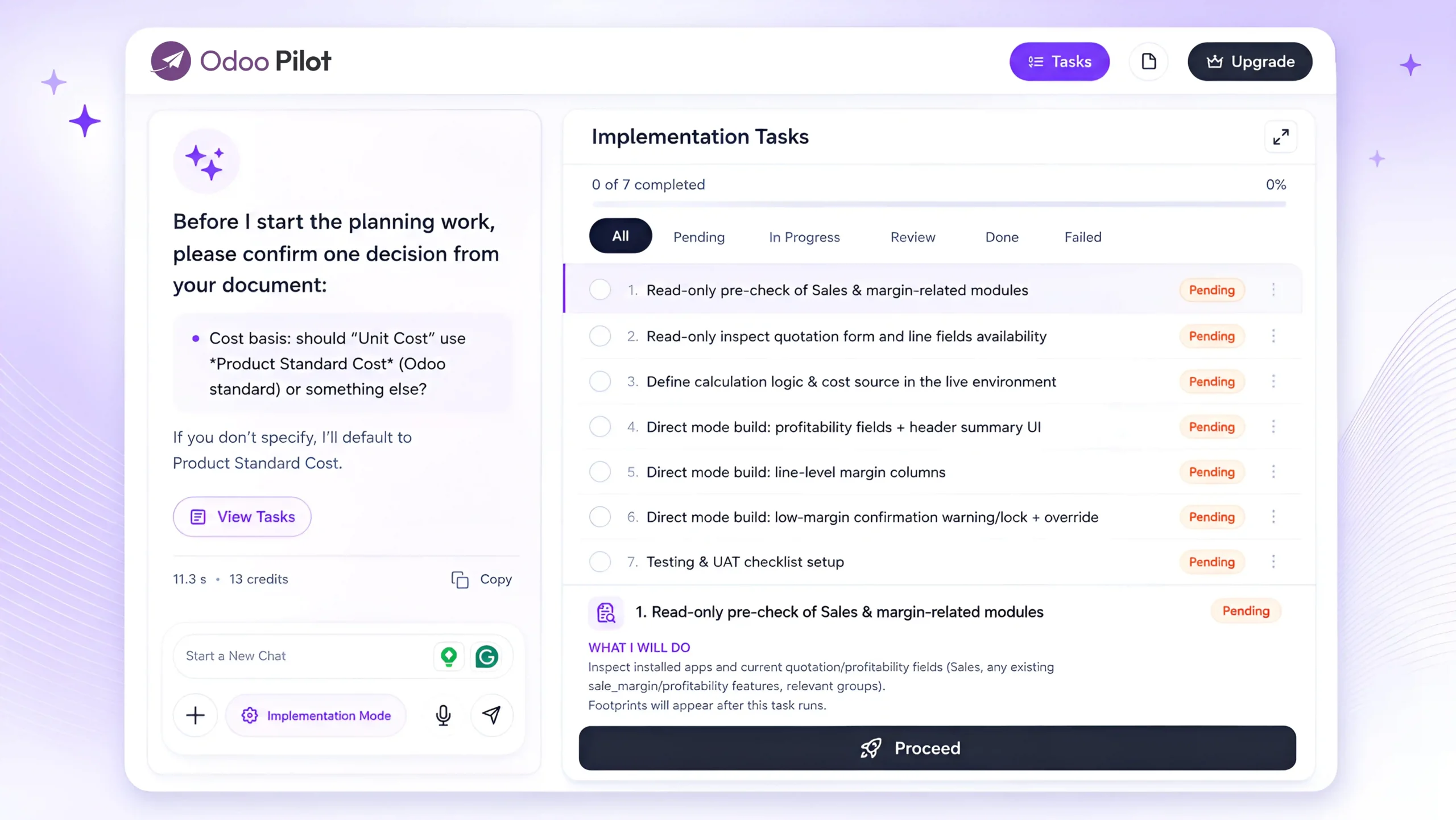
Watch how Odoo Pilot converts approved requirements into a structured implementation plan and completes each task directly in your connected Odoo database. Review every action before execution, track completed changes, and roll back supported actions whenever needed.

What Implementation Mode Helps You Do

Convert Approved Scope into Tasks Turn the approved project scope into clear implementation tasks with proper sequence, dependencies, and progress tracking.

Install Required Apps

Identify and install the required Odoo apps based on the approved business scope.

Configure the System

Set up system settings, workflows, business rules, approvals, operational processes, and preferences.
Manage Users & Access Rights

Create users, assign roles, configure permissions, and control who can access or approve specific actions.

Prepare & Import Data

Generate import templates, validate client data, detect errors, guide corrections, and support clean data import.

Confirm Before Every Change

Before applying any change, the system explains what will be changed and asks for user confirmation.

Review Completed Tasks

After each task, users can review the result, mark it completed, request changes, or provide feedback.
Rollback When Needed

Track implementation changes and support rollback where possible if a setup, configuration, or import needs to be reversed.
Prepare for Go-Live

Generate a final checklist to confirm setup, data, workflows, permissions, validations, and user review before launch.

Requirement Review

Complete Implementation Execution

Implementation Mode is not just a checklist. It supports the full implementation process after the project scope is approved.

Important Safety Message


Every implementation action is controlled. Before making any change, Implementation Mode explains what will be changed, asks for confirmation, tracks the action, and allows review after completion. If needed, rollback support helps reverse selected changes where possible.
From Approved Scope to Guided Implementation

Task Breakdown

AI converts the approved scope into clear setup, configuration, data, and validation tasks.
Go-Live Ready

Review completed tasks, validate results, generate documentation, and prepare for launch.

Approved Scope Upload

Upload or paste the approved project scope, documents, or final client requirements.

Guided Implementation

Complete each task step by step with confirmation before every system change.

1.
Approved Scope Upload

Upload or paste the approved project scope, documents, or final client requirements.

2.
Task Breakdown

AI converts the approved scope into clear setup, configuration, data, and validation tasks.

3.
Guided Implementation

Complete each task step by step with confirmation before every system change.

4.
Go-Live Ready

Review completed tasks, validate results, generate documentation, and prepare for launch.

Trusted by Odoo Experts Who Deliver Faster

See how Odoo teams use AI to reduce manual work, speed up presales, and manage delivery with more confidence.

Frequently Asked Question

Implementation Mode converts approved client requirements into a structured task plan and helps complete each configuration task directly in the connected Odoo database.

Yes. A live or testing Odoo database connection is required so Odoo Pilot can review the current setup and execute approved implementation tasks.

Odoo Pilot prepares each action and asks for approval before execution, allowing you to review the task before any changes are applied.

Implementation Mode can manage standard Odoo setup and configuration tasks across Sales, CRM, Purchase, Inventory, Accounting, Manufacturing, Projects, Employees, and other installed applications. This includes configuring workflows, users and access rights, warehouses, routes, taxes, payment terms, products, pricelists, and master data. Tasks requiring custom development can be moved to Pilot Studio or Module Builder.

Yes. Every task is displayed with its status, execution history, and completed actions so your team can clearly track implementation progress.

Supported actions include rollback footprints, allowing you to review changes and reverse eligible actions when required.

Join Odoo Pilot Today