
Presale Mode
Turn Client Requirements into Winning Odoo Proposals
Upload client requirements, discovery notes, RFPs, screenshots, or process details. Odoo Pilot analyzes the scope and creates a complete presale package with gap analysis, effort estimates, timelines, risks, architecture notes, mockups, and proposal direction.
Demo
See Presale Mode in Action
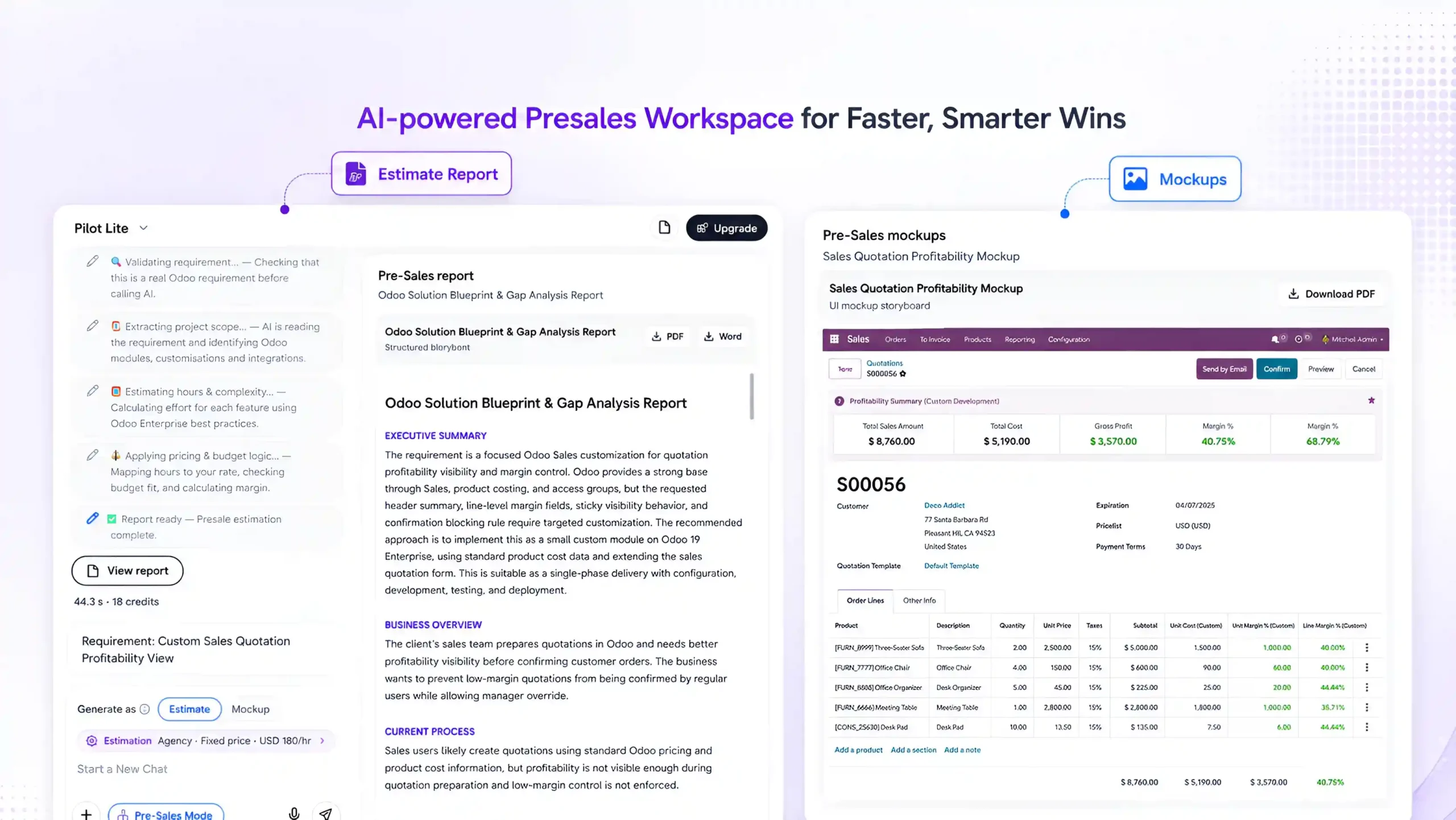
Watch how Odoo Pilot reads raw client requirements and generates a structured presale output with gap analysis, effort estimates, timeline, risks, solution blueprint, and visual mockups.
What Presale Mode Helps You Do

Analyze Requirements
Understand client needs from documents, notes, screenshots, RFPs, or discovery call summaries.
Create Gap Analysis
Identify what Odoo can do by default, what needs configuration, and what requires customization.
Estimate Effort & Timeline
Generate realistic effort estimation, project phases, delivery timeline, and risk buffer.

Build Solution Architecture
Create a clear blueprint showing modules, workflows, integrations, data flow, and customization areas.

Prepare Winning Proposal
Generate a client-ready proposal with scope, timeline, estimate, risks, assumptions, architecture, and demo plan.
Create Visual Blueprints
Show how customized Odoo screens, fields, buttons, workflows, approvals, and reports may look before development

Requirement Review
AI Requirement Review for Odoo Projects
Presale Mode reviews client requirements and clearly shows what is possible in standard Odoo, what needs setup, what requires customization, and what information is missing. This helps teams scope faster, estimate better, and propose with confidence.
- Default Odoo Features
- Configuration Needed
- Customization Required
- Required Odoo Modules
- Demo Requirements
- Missing Information
- Effort & Timeline
- Project Phases
- Risks & Assumptions
- Client Proposal Output
Visual Blueprints
Show Clients How Custom Odoo Features Will Look
Presale Mode creates visual customization blueprints so clients can understand proposed changes before development starts. Instead of only explaining customization in text, the system can show screen concepts, workflow diagrams, field changes, button placement, approval flows, reports, and before/after views.

Odoo Screens
Preview how customized Odoo screens may look after development.

Fields
Show new, removed, or reorganized fields clearly.

Buttons
Highlight new actions, triggers, smart buttons, and button placements.

Approval Flows
Show approval stages, user roles, and process flow.

Reports
Present expected report structure, filters, columns, and output format.

Before/After Concepts
Compare standard Odoo screens with proposed customized views.

From Requirement to AI Powered Workflow

AI Scope Analysis
AI analyzes the requirements to identify default Odoo features, configuration needs, customization gaps, missing details, and risks.

Client-Ready Proposal
Generate a professional proposal with scope, timeline, estimate, architecture, blueprint, demo plan, and next steps.


Requirement Input
Upload client notes, RFPs, screenshots, meeting summaries, or business requirements.

Gap Analysis & Estimation
Generate a structured gap analysis report with effort estimation, timeline, project phases, and assumptions.

Visual Blueprint
Create visual mockups, workflow diagrams, before/after screen concepts, and customization previews.
Requirement Input
Upload client notes, RFPs, screenshots, meeting summaries, or business requirements.
AI Scope Analysis
AI analyzes the requirements to identify default Odoo features, configuration needs, customization gaps, missing details, and risks.
Gap Analysis & Estimation
Generate a structured gap analysis report with effort estimation, timeline, project phases, and assumptions.
Client-Ready Proposal
Generate a professional proposal with scope, timeline, estimate, architecture, blueprint, demo plan, and next steps.

Visual Blueprint
Create visual mockups, workflow diagrams, before/after screen concepts, and customization previews.
Trusted by Odoo Experts Who Deliver Faster
See how Odoo teams use AI to reduce manual work, speed up presales, and manage delivery with more confidence.
Frequently Asked Question
Presale Mode turns client requirements into a structured Odoo solution proposal. It helps generate gap analysis, recommended solutions, effort estimates, implementation phases, risks, assumptions, and presentation-ready outputs.
You can provide written requirements, meeting notes, scope documents, process descriptions, spreadsheets, and other project files. Clearer and more complete inputs help Odoo Pilot produce a more accurate presale report.
The report can identify which requirements are supported by standard Odoo, which need configuration, and which may require customization or custom module development. It can also include effort estimates, dependencies, risks, assumptions, and recommended implementation phases.
Yes. Odoo Pilot can create visual mockups for proposed customizations, helping clients and delivery teams understand the recommended solution before development begins.
Presale Mode creates a strong first draft, but the consultant should review the scope, effort, pricing, exclusions, and technical assumptions before sharing it with the client. Final estimates should always reflect your delivery approach and commercial terms.
Yes. You can update the requirements, request changes, regenerate selected sections, and refine the estimate, phases, mockups, or solution approach as the client scope becomes clearer.